
Mar 31, 2026
The Ultimate Guide to Password Management for Seniors: Securing Digital Identities
The Ultimate Guide to Password Management for Seniors: Securing Digital Identities
The rapid digitization of modern life has transformed how society manages daily tasks, from banking and healthcare to socializing and shopping. For older adults, this digital shift offers unprecedented convenience and connectivity. However, the requirement to manage dozens of online accounts brings a significant challenge: maintaining secure, unique passwords for every digital service. As the digital footprint of older demographics expands, so does their exposure to sophisticated cyber threats. Cybercriminals frequently target older adults, exploiting vulnerabilities related to technology adoption and password management.
Navigating the complexities of cybersecurity does not have to be an overwhelming endeavor. With the right tools and strategies, securing digital identities becomes an automated and manageable process. This comprehensive guide explores the unique cybersecurity landscape facing older adults, the critical role of password managers, and actionable steps to implement robust digital security practices.
The Unique Cybersecurity Challenges Facing Older Adults
The transition to a fully digital lifestyle requires managing an extensive portfolio of credentials. An average internet user maintains over one hundred online accounts, ranging from critical financial institution portals to social media platforms. For older adults, managing this volume of credentials presents specific security and cognitive challenges.
The Cognitive Load of Credential Management
Security experts universally recommend using long, complex, and unique passwords for every account. A standard secure password might look like a random string of characters, numbers, and symbols. Memorizing dozens of these complex combinations is virtually impossible, leading many individuals to adopt risky workarounds.
A common, yet dangerous, practice is password reuse. When the same password is used across a banking portal, an email account, and a retail website, a security breach on the retail site compromises the financial and email accounts simultaneously. Another frequent workaround is maintaining a physical "password notebook." While writing passwords down is preferable to reusing weak passwords, physical notebooks present their own risks. They can be lost, destroyed in a house fire, or compromised by unauthorized individuals in the home. Furthermore, a physical book is entirely inaccessible if the user needs to log into an account while traveling or away from their desk.
Escalating Cyber Threats and Social Engineering
Older adults are disproportionately impacted by cyber fraud, often serving as primary targets for sophisticated social engineering and phishing campaigns. The growth of transnational criminal actors has led to a surge in phishing attacks, which often specifically target the financial resources and retirement savings of senior citizens (Trautman et al., 2020).
Phishing attacks typically manifest as fraudulent emails, text messages, or phone calls designed to manipulate the recipient into revealing sensitive information. Cybercriminals may masquerade as representatives from government agencies, banking institutions, or tech support services. They create a false sense of urgency—claiming an account has been compromised or a payment is overdue—to prompt the user into clicking a malicious link and entering their credentials into a forged website. Without robust security protocols in place, older adults remain highly vulnerable to these deceptive tactics. Organizations like the Federal Trade Commission (FTC) consistently emphasize the importance of adopting modern security technologies to combat these evolving threats.
What is a Password Manager?
A password manager is a specialized software application designed to generate, store, and auto-fill login credentials across websites and mobile applications. It functions as an encrypted digital vault that secures sensitive information behind a single, highly secure "Master Password."
When utilizing a password manager, the user only needs to remember one complex passphrase. The software handles the memorization and entry of every other credential. Modern password managers utilize advanced cryptographic standards, typically AES-256 bit encryption, which is the same security protocol utilized by financial institutions and government agencies to protect classified data.
Cloud-Based vs. Local Storage
- Password managers generally fall into two categories: cloud-based and local-only. Local
password managers store the encrypted database directly on the user's hard drive. While
this provides total offline control, it severely limits usability, as the passwords cannot be easily accessed on a smartphone or a secondary computer.
Cloud-based password managers, such as LastPass, Dashlane, and Keeper, synchronize the encrypted vault across all the user's devices via secure servers. This ensures that a password updated on a desktop computer is instantly available on a mobile phone. However, the adoption of these tools requires overcoming hesitation regarding cloud storage. Research indicates that users of password managers must navigate trust issues and transparency concerns, evaluating whether these third-party applications are suitable and secure for housing their most sensitive data (Alodhyani et al., 2020). Understanding the underlying security architecture is vital to building this trust.
Core Benefits of Using Password Managers for Older Adults
Implementing a password manager provides advantages that extend far beyond simple convenience. These tools actively harden an individual's digital defenses against a multitude of attack vectors.
1. Generation of Cryptographically Strong Passwords
Humans are naturally predictable when creating passwords, frequently relying on names, birthdates, or sequential numbers. Cybercriminals deploy automated "brute force" programs that can guess millions of these predictable combinations per second. A password manager eliminates this vulnerability by generating completely random, mathematically complex passwords up to 99 characters long. Because the user never has to type or memorize these passwords, maximum complexity can be achieved without sacrificing convenience.
2. Active Phishing Mitigation
One of the most powerful, yet least discussed, benefits of a password manager is its ability to thwart phishing attempts. Phishing relies on visual deception; a fraudulent website may look perfectly identical to a legitimate banking portal. However, a password manager evaluates the underlying URL structure, not the visual design. If a user is directed to a spoofed domain, the password manager will refuse to auto-fill the credentials, immediately alerting the user to the fraudulent nature of the site. This feature acts as a critical safety net against sophisticated scams monitored by agencies like the Cybersecurity and Infrastructure Security Agency (CISA).
3. Centralized Digital Organization
Beyond passwords, modern password vaults can securely store credit card numbers, banking routing information, passport details, and secure medical notes. This centralization simplifies digital life, allowing older adults to safely access all their vital information from a single, heavily fortified location, rather than scattering sensitive data across unencrypted documents or emails.
4. Secure Digital Inheritance
Planning for digital legacy is a critical component of modern estate planning. Many password managers offer "Emergency Access" or "Legacy Contact" features. This allows the user to designate a trusted family member, caregiver, or executor who can request access to the vault in the event of cognitive decline, medical emergency, or passing. The user dictates a waiting period—such as 48 hours—during which they can decline the request if it was made in error. This protocol ensures that loved ones can manage digital affairs without requiring the user to share their Master Password prematurely, aligning with digital planning recommendations from the National Council on Aging (NCOA).
Key Features to Prioritize When Selecting a Password Manager
Not all password management solutions are created equal. When evaluating options specifically for older adults, several crucial features should be prioritized to ensure both robust security and ease of use.
- Intuitive User Interface: The software must be navigable and legible. Overly
technical interfaces can cause frustration and lead to the abandonment of the software. Clear menus, straightforward browser extensions, and simple mobile applications are essential.
- Multi-Factor Authentication (MFA) Integration: A password manager must support
MFA to protect the master vault. The National Institute of Standards and Technology provides comprehensive digital identity guidelines, outlining the necessity of multi-factor cryptographic software and devices to ensure robust authenticator assurance levels (Grassi et al., 2017). This means requiring a secondary form of verification—such as a biometric scan or a code sent to a mobile device—before unlocking the vault.
- Cross-Platform Compatibility: The modern digital user often operates across
multiple ecosystems, perhaps using an Apple iPad, a Windows desktop computer, and an Android smartphone. The selected password manager must function seamlessly across all operating systems and web browsers.
- Dark Web Monitoring: Premium password managers proactively scan underground
forums and databases to determine if a user's email addresses or passwords have been exposed in a corporate data breach. This early warning system allows users to change compromised credentials before they can be exploited.
📊 Comparing Password Management Solutions for Older Adults
| Password Manager Category | Best Suited For | Emergency Access Feature | Interface Simplicity | Primary Drawback |
|---|
| Dedicated Cloud Managers (e.g., Dashlane, Keeper, Bitwarden) | Comprehensive security, cross-device syncing, and advanced features | Yes, usually includes robust digital inheritance and emergency sharing protocols | Moderate (requires an initial learning curve during setup) | Premium features often require an annual subscription fee |
|---|---|---|---|---|
| Built-in OS Managers (e.g., Apple iCloud Keychain, Google Password Manager) | Users fully embedded within a single technological ecosystem | Limited (Apple offers a broad Legacy Contact feature for the entire Apple ID) | High (natively integrated into the device, requiring no extra installation) | Highly restrictive if attempting to sync across competing platforms (e.g., Apple to Windows) |
| Local/Offline Managers | Highly technical users with strict aversions to cloud data storage | No built-in automated emergency sharing features | Low (requires manual synchronization, backups, and data management) | Significant risk of total data loss if the hardware device is damaged or lost |
Step-by-Step Guide: Implementing a Password Manager
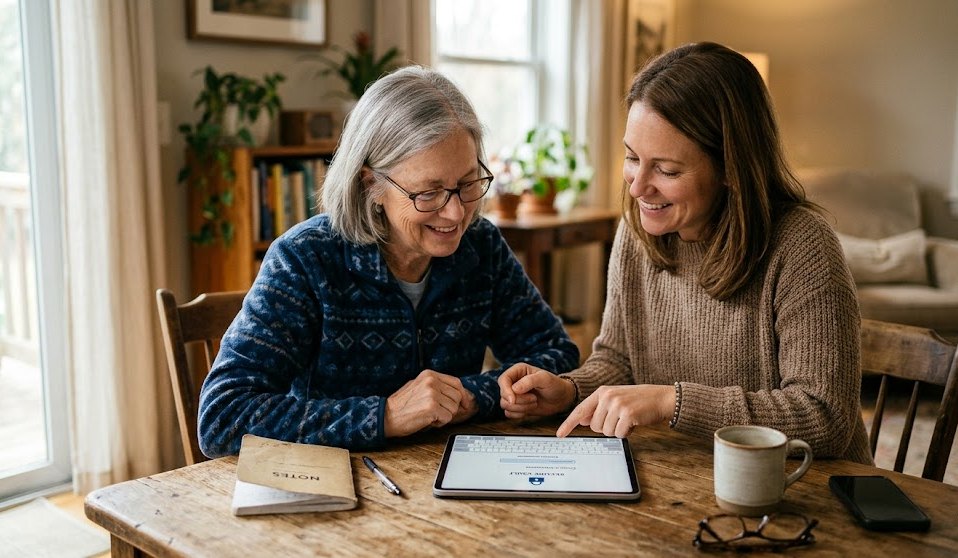
Transitioning from physical notebooks or memory-based password management to a digital vault is a process that requires patience and methodical execution. The following steps provide a clear pathway for older adults, or caregivers assisting them, to establish a secure digital identity framework.
Step 1: Select the Appropriate Software
Evaluate the options based on the comparison metrics provided above. For those seeking maximum security and legacy planning, a dedicated cloud manager is generally the superior choice. Many reputable providers offer free tiers, though the paid versions typically unlock essential features like advanced MFA and dark web monitoring.
Step 2: Formulate a Resilient Master Passphrase
The entire security architecture of a password manager relies on the strength of the Master Password. Instead of a complex, difficult-to-remember string of symbols, experts recommend using a "Passphrase." A passphrase consists of four to six random, unrelated words strung together. For example, "Coffee-Blanket-Symphony-Telescope." This methodology, endorsed by institutions like the National Institute of Standards and Technology (NIST), results in a password that is mathematically formidable against brute-force attacks yet relatively easy for the human brain to visualize and remember.
Step 3: Installation and Integration
Install the password manager application on the primary desktop or laptop computer, followed by the installation of the accompanying browser extension for Google Chrome, Safari, or Microsoft Edge. The browser extension is the operational bridge that allows the software to capture and auto-fill passwords as the user navigates the web. Subsequently, install the mobile application on smartphones and tablets, enabling biometric unlock (fingerprint or facial recognition) for ease of access on those specific devices.
Step 4: The Gradual Migration Strategy
Do not attempt to update every online account simultaneously; this causes fatigue and confusion. Instead, adopt a gradual migration strategy. As the user logs into their accounts during their normal daily routine—checking email, accessing a banking portal, ordering groceries—the password manager will prompt them to save the existing credential. Once saved, the user can navigate to the website's account settings and utilize the password manager's generator tool to replace the old, weak password with a new, cryptographically secure one.
Step 5: Activate Multi-Factor Authentication (MFA)
Once the vault is established, navigate to the password manager's security settings and enable MFA. This ensures that even if a malicious actor somehow obtained the Master Passphrase, they would be utterly unable to access the vault without physical possession of the user's secondary verification device, such as their smartphone.
Overcoming the Psychological Barrier of Trust
A frequent concern voiced by older adults regarding password managers is the concept of placing "all their eggs in one basket." The fear is that if the password manager company experiences a data breach, all of the user's credentials will be exposed simultaneously.
To overcome this hesitation, it is vital to understand the concept of "Zero-Knowledge Architecture." Reputable password management companies design their systems so that they never possess, store, or transmit the user's Master Password. The encryption and decryption of the vault occur entirely on the user's local device. When the vault is synced to the cloud, it is transmitted as an indecipherable blob of encrypted data. Even if hackers successfully breached the company's servers, they would only acquire heavily encrypted files that are mathematically impossible to crack without the user's unique Master Passphrase. The National Cybersecurity Alliance frequently highlights that utilizing a
reputable password manager is exponentially safer than relying on human memory or physical notebooks.
Best Practices for Ongoing Digital Hygiene
Establishing a password manager is the foundational step, but maintaining digital security requires ongoing vigilance.
- Conduct Periodic Security Audits: Most password managers feature a security
dashboard that analyzes the health of the vault. It will flag reused passwords, weak passwords, and old passwords that have not been changed in years. Users should periodically review this dashboard and resolve the flagged vulnerabilities.
- Guard the Master Passphrase: The Master Passphrase must never be shared via
email, text message, or spoken over the phone. Cybercriminals may attempt to impersonate tech support personnel from the password management company itself. It is a universal rule of cybersecurity that legitimate tech support will never ask for a user's password.
- Stay Informed on Scam Tactics: Even with a password manager, users must
remain educated on the evolving nature of digital fraud. Resources provided by the Identity Theft Resource Center and the Internet Crime Complaint Center (IC3) offer valuable, up-to-date information on current social engineering schemes and protective measures.
Frequently Asked Questions (FAQ)
Are built-in browser password managers (like Google Chrome's password saver) secure enough?
While built-in browser tools offer basic convenience and are better than reusing passwords, they often lack the robust security features of dedicated managers. They may not encrypt data with the same rigorous zero-knowledge protocols, and they frequently lack secure sharing, digital inheritance features, and cross-platform flexibility. If a user's computer is left unlocked, anyone who sits down at the keyboard may be able to access the browser's saved passwords, whereas dedicated managers typically lock automatically after a period of inactivity.
What happens if I completely forget my Master Passphrase?
Because of zero-knowledge architecture, the password manager company cannot reset or recover the Master Passphrase for you. If it is forgotten, the data inside the vault may be permanently lost. To prevent this, users are strongly advised to utilize the Emergency Access feature to designate a trusted contact. Additionally, many users choose to write the Master Passphrase down on a single piece of paper and secure it in a physical safe or a bank safety deposit box.
How can family members respectfully assist an older adult in setting up a password manager?
Assistance should be approached collaboratively, emphasizing empowerment rather than control. Caregivers can help by researching the best software, guiding the installation process, and helping to brainstorm a memorable passphrase. It is crucial to respect the older adult's privacy and autonomy; the goal is to provide them with the tools to manage their own security, while setting up emergency access protocols as a protective backup. Resources from the Consumer Financial Protection Bureau (CFPB) offer excellent guidance on helping older adults manage financial and digital risks collaboratively.
Will a password manager protect against viruses and malware?
No. A password manager is specifically designed to secure credentials and protect against credential-stuffing and phishing attacks. It does not replace the need for robust antivirus software, firewall protections, and safe browsing habits to defend against malware, ransomware, or keyloggers.
Conclusion
The digital world offers immense benefits, allowing older adults to manage their finances, access healthcare portals, and maintain vital connections with family and friends across the globe. However, the prerequisite for enjoying these digital conveniences is establishing a formidable defense against those who seek to exploit vulnerabilities.
Transitioning to a password manager represents a profound upgrade in personal cybersecurity. By removing the burden of memorizing complex character strings and mitigating the risk of devastating phishing attacks, password managers transform digital security from a source of anxiety into an automated, seamless background process. While the initial setup requires a methodical approach and a willingness to adopt new software, the long-term benefits—uncompromised security, centralized organization, and the peace of mind afforded by digital legacy planning—are immeasurable. Empowering older adults with these cryptographic tools ensures that they can navigate the internet safely, preserving their independence and protecting their digital identities for the future.
References and Further Reading
Related Blogs

The Complete Home WiFi Security Setup Guide: Protect Your Network and Personal Data
Jun 5, 2026
How to Spot a Fake Text Message in 2026
Jun 4, 2026

Prevent Grandparent Scams Now: A Complete Guide to Protecting Older Adults from Financial Fraud
Jun 2, 2026
Facebook Privacy Settings Guide: How to Take Control of Your Data and Stay Safe Online
May 29, 2026
How to Organize and Backup Digital Photos: A Complete Guide to Protecting Your Visual Memories
May 26, 2026

Where Are My Photos Stored? A Simple Guide to Cloud Storage
May 22, 2026

Essential Phone Security Settings for Seniors: A Comprehensive Guide to Staying Safe in the Digital Age
May 22, 2026
The Complete Guide to Identity Theft Recovery: Reclaim Your Financial Security Step by Step
May 19, 2026

Safe Internet Browsing Practices: A Comprehensive Guide to Protecting Your Digital Life
May 15, 2026

Essential Cybersecurity Guide for Older Adults: Password Management and Scam Prevention
May 13, 2026